Aerial threat – steps for informed action
Potential aerial threat – “Be alert!”
When do the Defence Forces alert: there is a possibility that drones or other dangerous aerial devices may end up in the region but there is no direct danger. For instance, a drone that will probably fly over the region and will not pose a direct threat to the population has strayed into or is entering the Estonian airspace.
Instructions
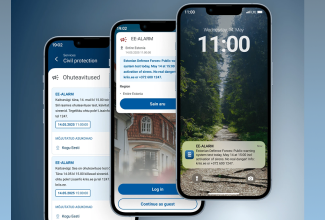
- You get an EE-ALERT alert about a potential aerial threat by SMS and/or in the app.
- It is not necessary to shelter. Live your everyday life, which also means children go to the kindergarten/school and adults go to work.
- Be alert about your surroundings and ready to shelter when moving outside, in case the situation changes.
- Be ready to shelter if you notice a threat, get an order to shelter or hear the sirens.
- Keep a charged phone at hand and follow the instructions you receive.
- If your child is at kindergarten or school, a loved one in a care home, he is under the care of the staff there and it is not necessary to bring him home. An educational or care institution, a hospital and other institutions have to ensure the safety of those under their care.
- The passing of a possible threat will be announced both in the EE-ALARM channels and via media.
- You can find further instructions on how to act at olevalmis.ee more information about the alert and the hazard at kriis.ee and the state helpline 1247.
- Have a calm discussion about the implications of a potential aerial threat and how to act during it with your family, elderly relatives, people under your care and others.
- Consider and discuss in advance how to act and protect those under your care and your loved ones if a potential aerial threat becomes a direct threat.
- Take care that your mobile phone has the Eesti app and the “Ole valmis!” app well in advance, that they are updated and that notifications are allowed.
Aerial threat – “Shelter immediately”
When do the Defence Forces alert: the aerial threat is direct, i.e. human health, life and assets are in danger. For instance, an aerial device in the Estonian airspace is giving reason to believe that it could attack or be directly and immediately dangerous to people in the region affected by the hazard.
instructions
- You may hear the sirens, get a sheltering order from the Defence Forces with an SMS, an app notification and/or via the ERR channels, or you notice a threat.
- Shelter immediately, indoors and away from windows if possible.
- Once you get a sheltering order, shelter where you are currently at – at home, at work, at school, at kindergarten, at the store or other indoor space, as moving around outdoors is life-threatening in case of a direct threat.
- Remember: the indoor space closest to you at the moment is the best place to shelter. Keep away from the windows and doors, go to the lowest possible floor, lower yourself near the ground and stay behind as many walls as possible.
- If it is not possible to go indoors, find a place where you are surrounded by walls or another barrier on at least one side, even if it is a ditch or a hollow in the ground. In the worst case, lie down and protect your head with your arms.
- If you are traveling in a vehicle, park it in the shelter of the nearest building or natural barrier (woods, mounds) in a way that it would not obstruct emergency vehicles. Leave the car and shelter elsewhere as a car does not offer sufficient protection in case of an aerial threat.
- Keep a charged phone at hand and follow further instructions.
- During the threat, you can get more information from kriis.ee or the state helpline 1247 and from ERR and other Estonian media channels.
- Educational institutions, hospitals, care and other similar facilities have to have thought through their actions during this kind of a situation, ensure the safety of those under their care and act according to instructions.
- Once the threat has passed and it is again safe to return to regular activities, it will be communicated through the hazard alert channels and the media.
- Have a calm discussion about the implications of a sheltering order and how to act during it with your family, elderly relatives, people under your care and others.
- Take care that your mobile phone has the Eesti app and the “Ole valmis!” app well in advance, that they are updated and that notifications are allowed.
What should you do if you find a potential attack or intelligence drone?
- Do not approach it! Act as you would when you find an explosive device – any unknown object could be dangerous.
- Notify the Emergency Response Centre by calling 112 immediately!
- Move away from the object to ensure your safety and warn the people nearby as well. Do not allow anyone near the object found.
- Do not share the location of the object in social media – this way you are preventing the gathering of curious people at the scene and reducing the danger for other people.
Please notice!
- The Defence Forces use the channels of the hazard alert system EE-ALARM: SMS messages and the mobile applications Eesti app and "Ole Valmis!"
- If necessary, the sirens will be activated. Information is also broadcast in ERR and other media channels.
- The alerts are sent to the region affected by the hazard.
- Pay close attention to what kind of instructions the state is giving. All alerts do not require sheltering.
- Keep in mind that more detailed information about the situation might take some time and the hazard alert contains only the initial and most critical instructions.
How to recognize an attack drone?
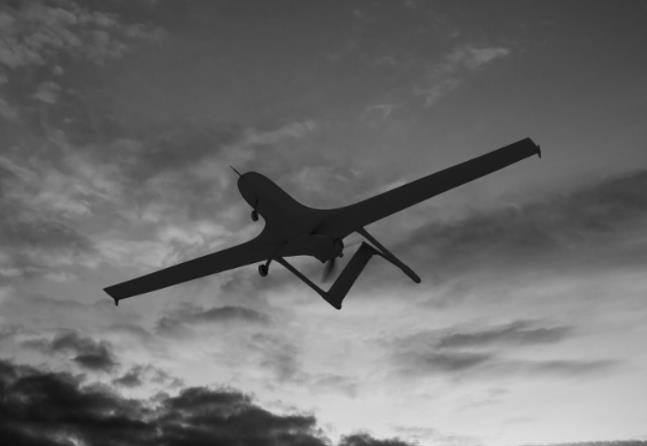
Attack drones are much bigger than civilian drones, their shape is similar to an airplane or a rocket and quite often triangular. They generally do not have four propellers like the drones used by recreational drone operators, and they work based on an internal combustion engine. Attack drones are not illuminated – there are no flashing lights on them.
Recreational drones have compulsory lights – red, green.
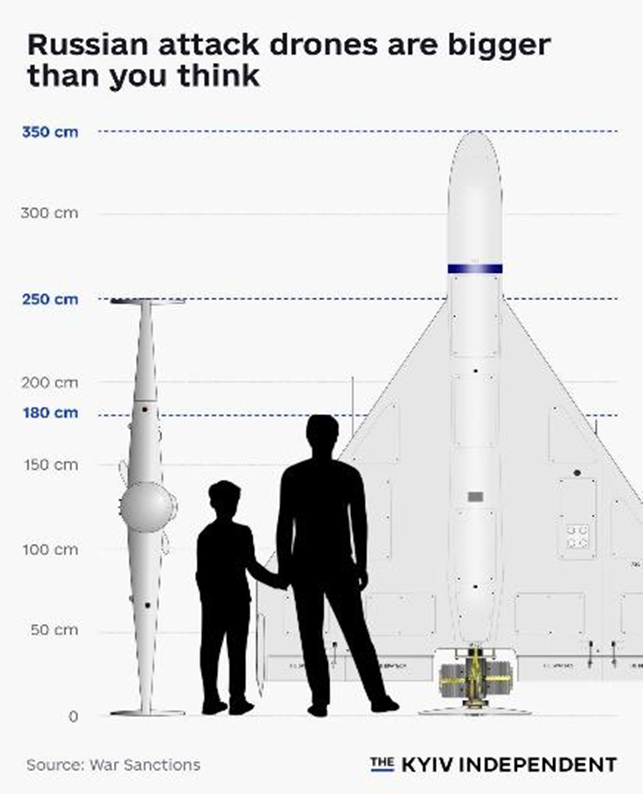
Attack drones have an internal combustion engine, and they emit an even monotone sound reminiscent of a moped or a lawn mower. .
A recreational drone operates with an electric engine, the sound is made by tiny propellers, and it buzzes during flight. The sound frequency of recreational drones is often varying due to constant course changes.
Listen to the sound of an attack drone:
An attack drone does not hover in one spot in the air, it is in constant motion. Their flight altitude is considerably lower than, for instance, airplanes.
A recreational drone, however, is capable of “standing in the air” in one spot and it can be quickly moved up and down, left and right with a remote controller.
Please notice!
- Even if there is no official warning, you should assess the aerial threat posed by any suspicious flying object and act with caution. If you hear the sound of a moped in the sky but do not see anything in the darkness, it is highly likely that you are dealing with an attack drone.
- Make sure of your safety: if necessary, move quickly to the nearest indoor space, stay as low as possible, away from windows and doors.
- Call 112 immediately, let them know your location and forward as many details as you hear or see.
-
If you find pieces of a drone or a whole crashed drone, do not go near or touch it. It may contain explosive parts. Call 112 immediately and give as precise a location as possible of yourself and the objects you found. Keep away from the crashed drone, do not take pictures or share the information on social media.